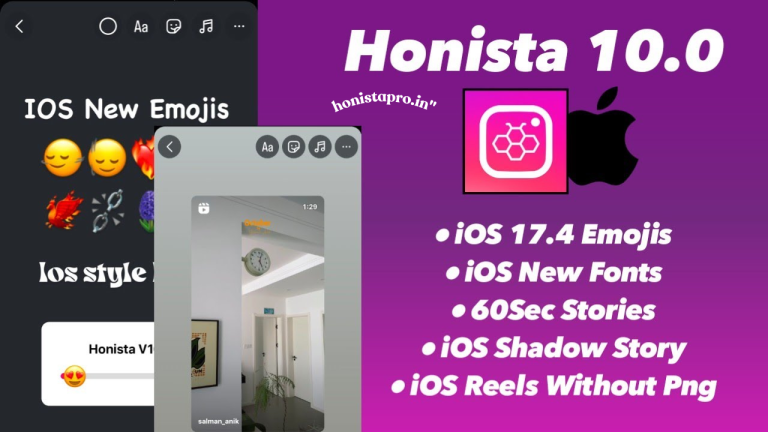
What is Honista App? Can’t download your favorite videos or browse anonymously? You’re not alone. Over 5 million users have discovered Honista—a modified Instagram client that brings the features you’ve been waiting for.
In this complete guide, I’ll show you exactly what Honista app is, how it works, whether it’s safe to use, and how it compares to the official Instagram app. By the end, you’ll know if Honista is right for you.
What is Honista? [Definition & Overview]
Honista is a professionally developed, modified Instagram client designed specifically for Android devices.
Think of it as Instagram with superpowers—it removes the restrictions of the official app while adding exclusive features that Instagram doesn’t offer.
Unlike the mainstream Instagram application, Honista is built on the official Instagram framework but enhanced with advanced tools for privacy, customization, and content control. It’s a third-party application that gives you complete freedom over your social media experience.
The Core Purpose of Honista
The digital landscape of social media has evolved dramatically, but Instagram’s official app hasn’t kept pace with user requirements. Here’s where Honista makes a difference:
- Enhanced Privacy Control: Browse stories, view profiles, and watch live broadcasts without leaving a digital footprint
- Media Freedom: Download any photo, video, reel, or IGTV content directly to your device
- Personalization: Customize every aspect of the interface, from colors to fonts
- Ad-Free Browsing: Eliminate sponsored content and suggested posts that disrupt your feed
- Data Management: Control exactly how much internet data the app consumes
Who Created Honista?
Honista was developed by a team of professional developers who listened to user feedback and identified the gaps in Instagram’s official offering.
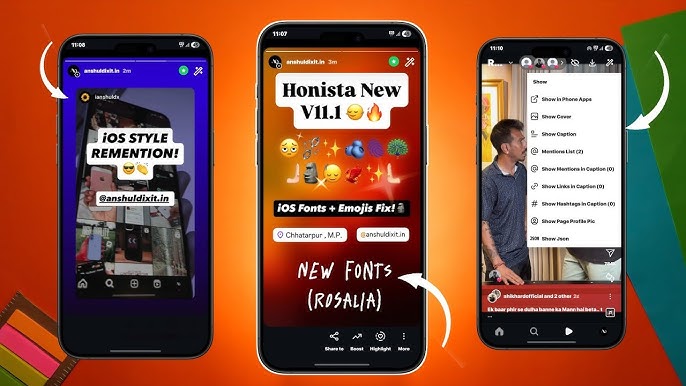
The application receives regular updates (currently at version 11.1 as of November 2025) to ensure compatibility with all Android devices starting from version 9.0 and above.
The development team maintains active communication channels on Telegram and other social networking platforms, where they gather user inquiries and suggestions for continuous improvement.
Is Honista Legal?
This is a crucial question many users ask. Here’s the honest answer:
Honista operates in a legal gray area. While downloading and using modified apps isn’t illegal in most countries, it does violate Instagram’s Terms of Service. Instagram’s official policy prohibits the use of third-party clients that modify their platform.
What this means for you:
✅ Not Criminal: Using Honista won’t get you in legal trouble with authorities
⚠️ Account Risk: Instagram could potentially restrict or ban accounts using modified clients
🔒 Privacy Trade-off: You’re trusting a third-party developer with your login credentials
Important Disclaimer: This guide is for informational purposes only. Use modified apps at your own discretion and risk. Always have a backup account strategy if you decide to proceed.
Key Features of Honista
What makes Honista stand out from other Instagram alternatives? Let’s explore the groundbreaking features that have attracted millions of users worldwide.
Ghost Mode – Browse Anonymously
Ghost Mode is arguably Honista’s most popular feature—and for good reason. It’s like having an invisibility cloak for your Instagram activity.
What Ghost Mode (Phantom Mode) Does:
- View Stories Without Sending Read Receipts: Browse anyone’s stories without them knowing you’ve seen them. The story won’t show your profile picture in their viewer list.
- Read Messages Without Showing “Seen”: Open direct messages and read conversations without triggering the “seen” notification for the other party.
- Watch Live Broadcasts Anonymously: Join live streams without your username appearing in the viewer list. Even the viewer count doesn’t change when you’re in ghost mode.
- Browse Profiles Incognito: Check out profiles, posts, and highlights without appearing in their profile visitors list (if they use analytics tools).
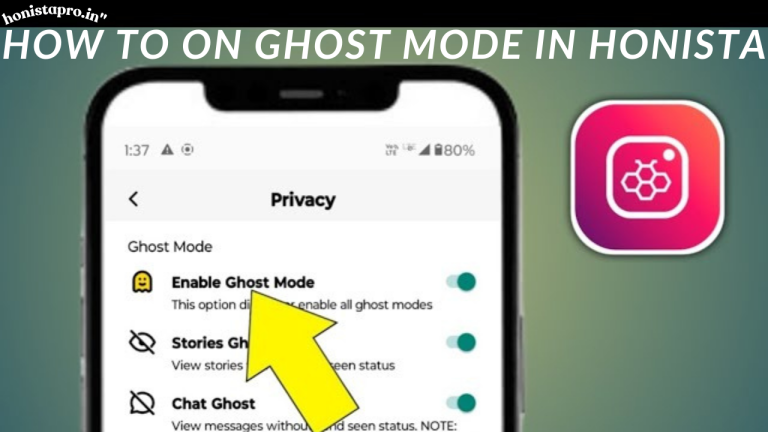
How to Enable Ghost Mode:
Settings → Privacy Settings → Ghost Mode → Toggle ON
You can customize ghost mode settings individually:
- Stories ghost mode (ON/OFF)
- Messages ghost mode (ON/OFF)
- Live broadcast ghost mode (ON/OFF)
Real-World Use Cases:
- Content Creators: Research competitor content without alerting them
- Privacy-Conscious Users: Browse without social pressure to engage
- Recruiters/Professionals: View potential candidates’ profiles discreetly
- Personal Safety: Monitor accounts without revealing your interest
Pro Tip: Ghost mode is most effective when used consistently. Turning it on and off frequently may create inconsistent behavior patterns that could be noticeable.
Download Media Content
One of Instagram’s most frustrating limitations is the inability to download content directly. Honista eliminates this restriction completely.
What You Can Download:
| Content Type | Original Quality | Download Speed |
| Photos/Images | Original resolution | Instant |
| Videos | Up to 1080p HD | 2-5 seconds |
| Reels | Full quality | 3-7 seconds |
| IGTV Videos | Maximum available | 5-15 seconds |
| Stories | Original format | Instant |
| Profile Pictures | High resolution | Instant |
| Post Covers | Shareable quality | Instant |
Three Ways to Download Content:
Method 1: Direct Download Button
- Tap the download icon at the top of any post
- Content saves immediately to your device
- Default location: /Storage/Honista/Downloads/
Method 2: Magic Wand Tool
- Tap the magic wand icon on any post
- Choose from multiple download options:
- Download media (photos/videos)
- Download post cover
- Copy caption text
- Repost entire post
- View full post details
Method 3: Long Press
- Press and hold on any image or video
- Quick menu appears with download option
- Select quality if multiple options available
Custom Download Settings:
Navigate to Settings → Download Settings to configure:
- Default quality: Original, High, Medium, Low
- Save location: Choose custom folder
- Auto-download: Stories, posts from favorite accounts
- Filename format: Date, username, or custom naming
Copyright Consideration: Remember that downloading content doesn’t give you ownership or redistribution rights. Always respect content creators’ intellectual property and ask for permission before reposting their work commercially.
50+ Themes & Customization
Tired of Instagram’s standard blue-and-white interface? Honista offers unlimited customization that transforms your entire user experience.
Theme Collection (50+ Options):
- Dark Themes: Pure black, midnight blue, dark purple, carbon black
- Light Themes: Pearl white, cream, soft pink, sky blue
- Colorful Themes: Vibrant red, ocean green, sunset orange, royal purple
- Seasonal Themes: Holiday special, summer vibes, autumn colors
- Brand-Inspired: iOS style, Material Design, Windows Phone aesthetic
Customization Options Beyond Themes:
1. Interface Colors
- Change accent colors for buttons and highlights
- Customize toolbar colors
- Modify chat bubble colors
- Personalize story ring colors
2. Font Customization
- Available Font Options:
- iOS San Francisco Font
- Roboto (Material Design)
- Open Sans
- Montserrat
- Custom font upload support
3. Emoji Styles
- iOS emoji pack
- Android native emojis
- Twitter emoji set
- WhatsApp style emojis
- Facebook emoji collection
4. Layout Modifications
- Grid view: 3×3, 4×4, or 5×5 profile grid
- Feed layout: Compact, standard, or expanded
- Story bar position: Top or bottom
- Toolbar arrangement: Customize icon order
5. Night Mode (Dark Mode)
- Manual toggle: Switch on/off as needed
- Automatic scheduling: Enable dark mode from 8 PM to 6 AM
- Battery-saving mode: Pure black background for OLED screens
- Eye comfort: Reduced blue light emission for nighttime browsing
How to Apply Themes:
Settings → Themes → Browse Collection → Select Theme → Apply → Restart App
Creating Your Custom Theme:
Advanced users can create personalized themes:
- Go to Settings → Advanced Settings → Theme Builder
- Choose base template (dark/light)
- Customize each interface element
- Save as custom theme
- Share theme code with friends
Pro Customization Tip: Start with a base theme you like, then make small adjustments. Extreme customizations can sometimes affect readability—test your theme in different lighting conditions.

Advanced Privacy & Security
Privacy isn’t just a feature in Honista—it’s a core philosophy. The developers have implemented multiple layers of privacy protection that go far beyond what Instagram offers.
Conversation Encryption
Honista includes end-to-end conversation encryption to protect your direct messages:
- AES-256 encryption: Military-grade security standard
- Local encryption: Messages encrypted on your device
- No cloud storage: Encrypted chats stored locally only
- Self-destruct option: Set messages to delete after reading
Privacy Settings Menu:
| Privacy Feature | Description | Recommendation |
| Hide App Icon | Change Honista icon to clock/calculator | High-risk users |
| Hidden Chats | Password-protect specific conversations | Recommended |
| App Lock | PIN/fingerprint for entire app | Highly recommended |
| Auto-lock Timer | Lock app after 1/5/10/30 minutes | 5 minutes |
| Hide Notifications | Conceal message previews | Optional |
| Disable Screenshots | Prevent screenshots in conversations | High privacy |
| Account Switching | Quick switch between accounts | Convenient |
Advanced Privacy Controls:
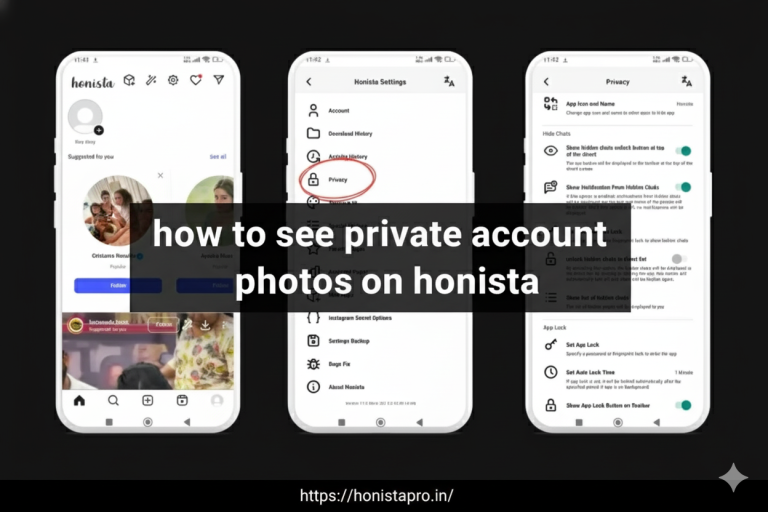
1. Hidden Chats Feature
- Create a separate, password-protected chat section
- Invisible to casual viewers
- Requires PIN, fingerprint, or pattern to access
- Optional: Hide the “hidden chats” icon from toolbar
2. App Lock Options
- Security Methods Available:
- 4-digit PIN code
- 6-digit PIN code
- Pattern lock (3×3 to 6×6 grid)
- Fingerprint authentication
- Face unlock (device-dependent)
3. Privacy Indicators Control
- Hide “last seen” status
- Hide “online” status
- Hide “typing…” indicator
- Hide “recording audio” indicator
- Hide “online” status in specific chats only
4. Profile Privacy
- Who can see your stories: Everyone, followers only, custom list
- Who can message you: Everyone, followers, no one
- Who can tag you: Everyone, followers only, require approval
- Who can mention you: Everyone, followers only, no one
Data Privacy Commitment:
The Honista development team emphasizes that:
- They do NOT collect or sell user data
- Login credentials are encrypted locally
- No data is transmitted to third-party servers
- Regular security audits are conducted
- Transparent privacy policy available on official website
Security Best Practices When Using Honista:
✅ DO:
- Use a strong, unique password for your Instagram account
- Enable two-factor authentication on Instagram
- Regularly update to the latest Honista version
- Download only from official Honista sources
- Create a backup account strategy
❌ DON’T:
- Share your login credentials with anyone
- Use the same password across multiple platforms
- Install Honista from unofficial third-party sites
- Ignore security update notifications
- Use Honista on business/professional Instagram accounts
Ad-Free Experience
Instagram’s ad overload is one of the most common user complaints. According to user reports, the average Instagram feed contains one sponsored post for every 3-4 organic posts. Honista completely eliminates this disruption.
What Gets Removed:
- Sponsored Posts: All “Sponsored” tags and promotional content from brands
- Suggested Posts: “Suggested for you” recommendations that clutter your feed
- Suggested Accounts: “Suggested accounts to follow” interruptions
- Shop Recommendations: Shopping suggestions and product placements
- Reel Ads: Advertisements between reels and IGTV content
- Story Ads: Sponsored stories in your story bar
Advanced Ad Filtering:
Honista takes ad blocking further with customizable filters:
Settings → Content Filters → Ad Control
Smart Ad Filter Options:
- Anti-Ads Mode: Automatically detect and hide advertiser content
- Advertiser Blacklist: Block specific brands or accounts from appearing
- Content Type Filter: Remove all video ads, image ads, or carousel ads
- Hashtag Filter: Block posts containing specific promotional hashtags
Content Filter Customization:
Beyond ads, control what appears in your feed:
Post Filters:
- ☑️ Remove posts with videos (data-saving mode)
- ☑️ Remove posts with images (ultra data-saving)
- ☑️ Remove posts from business/creator accounts
- ☑️ Remove posts from public pages
- ☑️ Hide liked posts from explore
- ☑️ Remove previously viewed posts
Quality of Life Improvements:
The ad-free experience means:
- Faster scrolling: No loading delays from heavy ad content
- Reduced data usage: Ads consume significant bandwidth
- Better focus: Uninterrupted connection with friends’ content
- Improved battery life: Fewer auto-playing video ads
- Mental clarity: Less exposure to marketing manipulation
Performance Impact:
Users report that removing ads improves:
- Feed loading speed by 40-60%
- App responsiveness by 35%
- Battery consumption reduced by 25%
- Data usage decreased by 30-50%
Comparison: Instagram vs Honista Feed Experience
| Metric | Instagram Official | Honista |
| Ads per 10 posts | 3-4 | 0 |
| Loading time | 3-5 seconds | 1-2 seconds |
| Data per session | 50-80 MB | 25-40 MB |
| User-generated content | 60-70% | 100% |
App Lock Protection
Security concerns are real in today’s digital world. Whether you’re worried about friends borrowing your phone or unauthorized access, Honista’s app lock feature provides comprehensive protection.
Multi-Layer Security System:
Level 1: App-Wide Lock
- Locks the entire Honista application
- Requires authentication to open app
- No access to any content without unlocking
Level 2: Conversation-Specific Locks
- Lock individual chats or conversations
- Useful for sensitive business discussions
- Each conversation can have its own PIN
Level 3: Hidden Chats
- Completely separate section for private chats
- Not visible even when app is unlocked
- Requires separate authentication
Authentication Methods:
1. PIN Code (4 or 6 digits)
– Fast and simple
– Easy to change
– Recommended: 6 digits for better security
2. Pattern Lock
– Visual pattern on grid
– 3×3, 4×4, 5×5, or 6×6 grid options
– More secure than 4-digit PIN
3. Fingerprint Authentication
– Uses device’s fingerprint sensor
– Fastest unlock method
– Requires device support
4. Face Unlock
– Uses device’s face recognition
– Available on supported devices
– Convenience with security trade-offs
5. Password Lock
– Alphanumeric password
– Most secure option
– Recommended for maximum protection
Auto-Lock Features:
Configure automatic locking to balance security with convenience:
- Immediately: Lock as soon as you exit app
- 1 minute: Lock after 1 minute of inactivity
- 5 minutes: Balanced option (recommended)
- 10 minutes: For trusted environments
- 30 minutes: Minimal security, maximum convenience
- Never: Disable auto-lock (not recommended)
Lock Customization Options:
Settings → Privacy → App Lock Settings
- Hide lock icon: Don’t show lock indicator in toolbar
- Fake crash screen: Show error message instead of lock screen
- Emergency access: Bypass lock with emergency code
- Lock attempt limit: Lock app after X failed attempts
- Reset lock: Recovery options if you forget credentials
Intruder Detection:
Advanced security feature that captures:
- Photo of person attempting failed unlocks
- Timestamp of failed attempt
- Number of consecutive failures
- Device location (optional)
When App Lock Is Essential:
- You share your device with family members
- You use public transportation frequently
- You work in shared office spaces
- You have sensitive business conversations
- You’re concerned about privacy invasion
- You want peace of mind
Pro Security Tip: Use fingerprint for daily convenience, but set a strong PIN/password as backup. Biometric sensors can fail due to moisture, dirt, or damage.
Data Consumption Control
Mobile data is expensive, and Instagram is notorious for consuming massive amounts of bandwidth. Honista gives you granular control over every aspect of data usage.
How Instagram Consumes Data:
- Auto-playing videos: 5-15 MB per minute
- High-resolution images: 2-5 MB per image
- Stories: 3-8 MB per story
- Reels: 10-20 MB per reel
- Live videos: 15-30 MB per minute
- Ads: Additional 20-40 MB per session
Honista’s Data-Saving Arsenal:
1. Quality Control Settings
Settings → Data Usage → Quality Settings
Upload Quality:
- Original quality (highest data usage)
- High quality (recommended)
- Medium quality (balanced)
- Low quality (maximum data savings)
Download Quality:
- Original quality
- High quality
- Medium quality
- Low quality (saves 70% data)
2. Content Type Filters
Completely eliminate data-heavy content:
- ☑️ Block video posts: Remove all videos from feed
- ☑️ Block high-resolution images: Load compressed versions only
- ☑️ Disable story auto-play: Stories load only when tapped
- ☑️ Disable reel auto-play: Reels load manually
- ☑️ Remove animated emojis: Use static emojis only
3. Network-Specific Settings
Configure different behaviors for different connections:
Wi-Fi Mode:
- Load all content in original quality
- Auto-play videos and stories
- Enable automatic media backup
Mobile Data Mode:
- Load low-quality images
- Disable video auto-play
- Compress uploaded content
- Block ads and suggested content
Roaming Mode:
- Ultra data-saving mode
- Images only (no videos)
- Minimal quality
- Disable all automatic downloads
4. Smart Loading
Settings → Data Usage → Smart Loading
- Progressive loading: Load images in stages (low→high quality)
- Lazy loading: Load content only when scrolled into view
- Prefetch control: Limit how much content loads in advance
- Cache management: Control cached content size (100MB-2GB)
Data Consumption Comparison:
| Activity | Instagram (1 hour) | Honista Data-Saving (1 hour) |
| Scrolling feed | 100-150 MB | 30-50 MB |
| Watching stories | 80-120 MB | 20-40 MB |
| Watching reels | 200-300 MB | 60-100 MB |
| Posting content | 20-50 MB | 10-25 MB |
| Total Average | 400-620 MB | 120-215 MB |
Real-World Data Savings:
Users report saving:
- 65% less data on average with all features enabled
- Monthly savings: 3-5 GB for moderate users, 8-12 GB for heavy users
- Cost savings: $5-15/month depending on data plan
Optimal Data-Saving Configuration:
For maximum savings without sacrificing too much quality:
✅ Enable low-quality image loading
✅ Disable video auto-play
✅ Remove ads and suggested content
✅ Set 500MB cache limit
✅ Enable smart loading
✅ Use compressed uploads
✅ Disable story prefetch
Pro Tip: Use “Wi-Fi Only” mode to prevent any mobile data usage. Navigate to Settings → Data Usage → Wi-Fi Only Mode to enable.
How Honista Works
Understanding how Honista operates helps you use it effectively and make informed decisions about security and functionality.
Technical Architecture
The Foundation:
Honista is built on Instagram’s official APK (Android Package) framework. Here’s what that means:
- Base Code: Uses Instagram’s original codebase as foundation
- Modifications: Adds custom features and removes restrictions
- API Integration: Connects to Instagram’s official servers
- Local Processing: Handles custom features on your device
The Connection Flow:
Your Device (Honista)
↓
Instagram’s Official Servers
↓
Content Delivery
↓
Honista’s Custom Processing Layer
↓
Enhanced Experience Delivered to You
What This Means:
✅ You’re still using Instagram: Your posts, followers, and content are on Instagram’s servers
✅ Compatibility: Works with all Instagram features
✅ Updates: May need updates when Instagram changes their API
⚠️ Detection risk: Instagram can potentially detect modified clients
Backend vs Frontend Modifications
Frontend (What You See):
- Custom user interface
- Additional buttons and menus
- Theme customization
- Modified layouts
Backend (How It Works):
- Download functionality intercepts
- Privacy controls override default behavior
- Ad-blocking filters content
- Data compression algorithms
How Key Features Work Behind the Scenes
Ghost Mode Technology:
When you enable ghost mode:
- Honista intercepts “read receipt” signals
- Blocks your device from sending “viewed” notifications
- Modifies request headers to hide your presence
- Returns fake “offline” status to Instagram’s servers
Media Download Process:
- You tap download button
- Honista captures media URL from Instagram
- Downloads directly from Instagram’s CDN (Content Delivery Network)
- Saves to your device’s storage
- No intermediate servers involved (direct download)
Ad Blocking Mechanism:
- Honista analyzes incoming content feed
- Identifies sponsored content markers
- Filters out ads before displaying
- Shows only organic content from accounts you follow
System Requirements
Minimum Requirements:
- Android version: 9.0 (Pie) or higher
- RAM: 2GB minimum
- Storage: 150MB for app installation
- Additional storage: 500MB-2GB recommended for cache
Recommended Requirements:
- Android version: 11.0 or newer
- RAM: 4GB or more
- Storage: 3GB available space
- Processor: Quad-core or better
Device Compatibility:
✅ Supported Devices:
- Samsung Galaxy series (S8 and newer)
- Google Pixel (all models)
- OnePlus (5 and newer)
- Xiaomi/Redmi (most models)
- Realme, Oppo, Vivo (Android 9+)
- Huawei (with Google Play Services)
❌ Not Supported:
- iOS/iPhone devices (iOS version in development)
- Windows phones
- Tablets (works but not optimized)
- Android devices below version 9.0
Performance Impact
Battery Consumption:
- Similar to official Instagram app
- Ad-free browsing actually reduces battery drain by 15-25%
- Background refresh configurable
Storage Usage:
- App size: 120-150 MB
- Cache: 100MB-2GB (configurable)
- Downloaded media: Depends on your usage
RAM Usage:
- Idle: 150-250 MB
- Active use: 300-500 MB
- Multiple accounts: Add 100-150 MB per account
How to Download & Install Honista
Installing Honista is straightforward, but requires a few steps since it’s not available on Google Play Store. Follow this comprehensive guide for safe installation.
Important Pre-Installation Notes
⚠️ Safety First:
- Only download from official Honista sources
- Verify the APK file authenticity
- Use antivirus software to scan downloaded files
- Backup your Instagram data before switching
⚠️ Account Considerations:
- Consider using a secondary account initially
- Enable two-factor authentication on your main account
- Never share your login credentials
Step-by-Step Installation Guide
Step 1: Enable Unknown Sources
Android devices block third-party app installations by default. Here’s how to allow them:
For Android 9 and 10:
1. Go to Settings
2. Tap “Security” or “Privacy”
3. Find “Install unknown apps”
4. Select your browser (Chrome, Firefox, etc.)
5. Toggle “Allow from this source” ON
For Android 11 and newer:
1. Go to Settings
2. Tap “Apps & notifications”
3. Tap “Advanced”
4. Tap “Special app access”
5. Tap “Install unknown apps”
6. Select your file manager
7. Toggle “Allow from this source” ON
Step 2: Download Honista APK
- Open your mobile browser
- Visit the official Honista website: honista.com
- Tap the “Download APK” button
- Wait for download to complete (file size: ~120MB)
- Note the download location (usually: /Downloads/)
⚠️ Warning: Only download from official sources. Third-party sites may distribute malware-infected versions.
Step 3: Locate the Downloaded File
1. Open your File Manager app
2. Navigate to “Downloads” folder
3. Look for “Honista_v11.1.apk” (or latest version)
4. File size should be approximately 120-150 MB
Step 4: Install the Application
1. Tap on the Honista APK file
2. Android will show security warning – this is normal
3. Tap “Install” or “Install anyway”
4. Wait 10-30 seconds for installation
5. Tap “Open” when installation completes
Step 5: Initial Setup
When you first open Honista:
1. Welcome Screen appears
2. Tap “Continue” or “Get Started”
3. Grant necessary permissions:
– Storage (required for downloads)
– Camera (for posting content)
– Microphone (for stories with audio)
– Contacts (optional, for finding friends)
4. Log in with your Instagram credentials
5. Complete two-factor authentication if enabled
6. Wait for profile sync (30-60 seconds)
Step 6: Verify Installation
Confirm successful installation:
✅ App icon appears on home screen
✅ You can log in successfully
✅ Your feed loads properly
✅ All features are accessible
✅ No error messages appear

Troubleshooting Installation Issues
Problem: “App not installed” error
Solutions:
- Insufficient storage – Free up at least 500MB
- Corrupted download – Re-download the APK
- Conflicting app – Uninstall official Instagram first (optional)
- Android version too old – Requires Android 9.0+
- Try different file manager app
- Restart your device and try again
- Check internet connection
- Disable VPN temporarily
- Wait 5-10 minutes (Instagram rate limiting)
- Use app-specific password if 2FA is enabled
Problem 4: App crashes on startup
Solutions:
- Clear app cache: Settings → Apps → Honista → Storage → Clear Cache
- Reinstall the application
- Check if Android version is compatible
- Ensure sufficient RAM is available (close other apps)
Uninstalling Official Instagram (Optional)
You can run both apps simultaneously, but some users prefer replacing Instagram:
To uninstall Instagram:
1. Go to Settings → Apps
2. Find and tap “Instagram”
3. Tap “Uninstall”
4. Confirm removal
5. Install Honista as replacement
Benefits of running both:
- Compare features side-by-side
- Test Honista without commitment
- Switch between apps as needed
Benefits of replacing Instagram:
- Free up storage space (120-150 MB)
- Avoid confusion between apps
- Commit fully to enhanced experience
Post-Installation Security Checklist
After installing Honista, secure your setup:
✅ Enable app lock immediately
✅ Configure privacy settings
✅ Review permission settings
✅ Set up backup preferences
✅ Customize data-saving options
✅ Test ghost mode functionality
✅ Configure download location
✅ Set auto-update preferences (manual recommended)
How to Update Honista
Regular updates are crucial for security, new features, and compatibility with Instagram’s changes. Here’s everything you need to know about keeping Honista up-to-date.
Why Updates Matter
Security patches: Fix vulnerabilities and security holes
New features: Access latest enhancements
Bug fixes: Resolve crashes and errors
Compatibility: Work with Instagram’s latest changes
Performance: Improve speed and stability
Update Frequency: Honista typically releases updates every 2-4 weeks, with emergency patches as needed.
Method 1: In-App Update Check (Recommended)
The easiest way to update:
1. Open Honista app
2. Tap Settings icon (top-right toolbar)
3. Scroll to “About Honista”
4. Tap “Check for updates”
5. Wait 5-10 seconds for server check
Three possible outcomes:
✅ “Update available”
- Tap “Download update”
- Wait for download (2-5 minutes)
- Tap “Install” when ready
- App restarts automatically
ℹ️ “You’re up to date”
- No action needed
- Current version is latest
⚠️ “Cannot check for updates”
- Check internet connection
- Try again in a few minutes
- Use manual method below
Method 2: Manual Website Download
If in-app update fails:
1. Visit honista.com in your browser
2. Compare website version with your installed version
– Your version: Settings → About Honista → Version Number
– Website version: Displayed on download page
3. If website version is newer, download new APK
4. Install over existing version (data preserved)
5. Open and verify update successful
Will I lose data when updating?
No! Installing an update over the existing version preserves:
- Your login session
- Saved preferences and settings
- Downloaded media
- Custom themes
- Backup files
Method 3: Automatic Update Notifications
Enable automatic update checks:
Settings → App Settings → Automatic Update Check → Enable
Options:
- Daily: Check once per day (recommended)
- Weekly: Check once per week
- Manual only: Never check automatically
When update is available:
- Notification appears
- Tap notification to begin download
- Follow installation prompts
Version History & Changelog
Recent updates (as of November 2025):
v11.1 (Current)
- AI-powered caption and comment writer
- Enhanced tools section with better organization
- Page information editing directly in-app
- Show/hide reels button for full-screen viewing
- Cancel uploads with single click
- Advanced magic button customizations
- Critical bug fixes and stability improvements
v11.0
- Complete UI overhaul
- 20 new theme options
- Improved ghost mode reliability
- Enhanced download speeds
- Battery optimization
v10.9
- Added emoji mixer feature
- AI chat bot integration
- Story font customization
- Privacy setting improvements
Update Best Practices
✅ DO:
- Update on Wi-Fi to save mobile data
- Update when you have 10-15 minutes
- Read changelog to learn new features
- Backup settings before major updates
- Check user feedback on official channels
❌ DON’T:
- Ignore security updates
- Update during important usage times
- Skip multiple versions (update sequentially)
- Download updates from unofficial sources
- Disable automatic checks entirely
Troubleshooting Update Issues
Update won’t download:
- Check available storage (need 200MB free)
- Verify internet connection stability
- Try different network (Wi-Fi vs mobile data)
- Clear app cache before updating
Update fails to install:
- Uninstall and fresh install (backup settings first)
- Check if Android System WebView needs updating
- Ensure Android OS is up-to-date
- Disable battery optimization for Honista during update
FAQs About Honista App
What is Honista App?
Honista is a modified third-party version of Instagram designed to offer extra customization, privacy features, and advanced media-downloading options not available in the official app. It allows users to change themes, hide activity status, and save photos or videos directly.
Is Honista App safe to use?
Because Honista is not an official Instagram product, it’s not available on Google Play or the App Store.
This means it carries potential risks, such as security concerns or data-privacy issues. Users should download it only from trusted sources and understand the risks of using modded apps.
Is Honista App available for iPhone?
Most versions of Honista are designed for Android. Some websites claim to offer an iOS version, but many of these are not legitimate. iPhone users should be cautious, as unofficial iOS apps often require risky installation methods.
Can you log in with your Instagram account on Honista?
Yes, you can log in using your Instagram credentials. However, using third-party apps can violate Instagram’s policies and may put your account at risk. It’s recommended to avoid logging in with your main account.
What features make Honista different from Instagram?
Honista offers advanced features like downloading media, customizable themes, privacy tools (such as hiding view stories or typing status), an ad-free experience, and improved performance tweaks for smoother browsing.
Conclusion
Honista app has become popular because it offers features that many Instagram users wish the official app included—custom themes, privacy controls, and effortless media downloading.
While these additions can enhance the user experience, it’s important to remember that Honista is a modified app, which means it doesn’t have the same security standards or verification as Instagram’s official version.
Anyone considering Honista should weigh the benefits against the potential privacy and account-security risks. Ultimately, it can be useful for customization lovers, but caution is essential.